


01
Manual data merging in Excel
Dane z różnych źródeł, długie zamknięcia miesiąca.

01
A single data source
Scattered data unified in one system.

Still planning and reporting in Excel? Are your processes time-consuming? Fincorex® streamlines controlling processes and tasks, so you gain time for analysis and decisions.
Trusted by









11
lat na rynku
Rozwijamy Fincorex® razem z działami controllingu naszych klientów.
50
implemented models
Cost models, budgets and consolidations built in the system.
3 500
system users
Controllers and CFOs working on a single set of data.
Fincorex® is a system for financial reporting, planning and consolidation. It was built to meet the needs of controllers and CFOs looking for an efficient EPM tool.

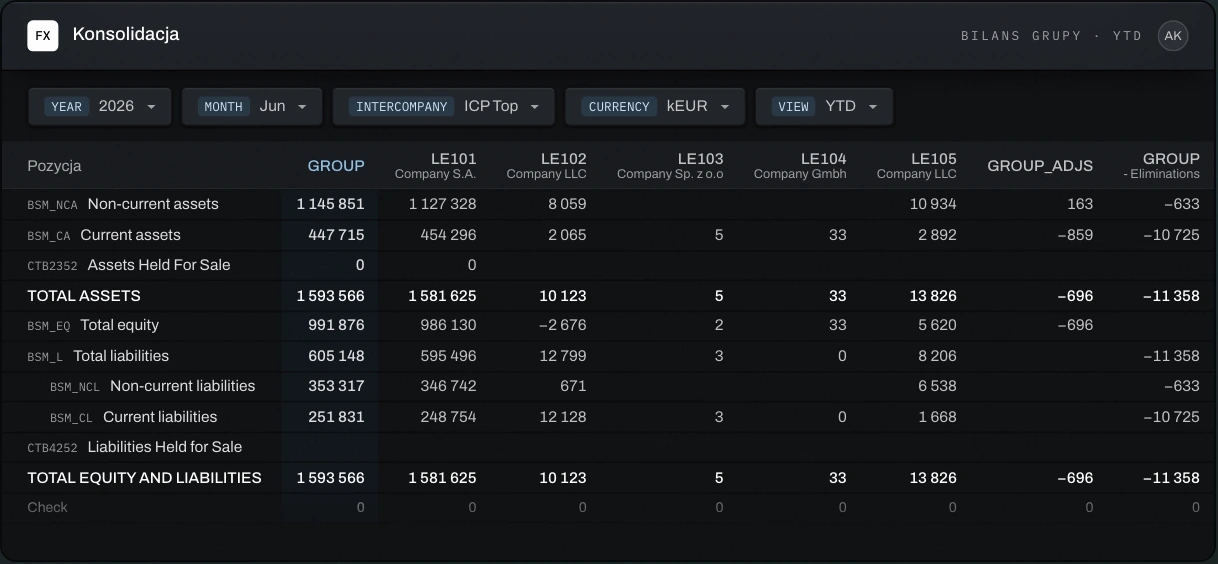
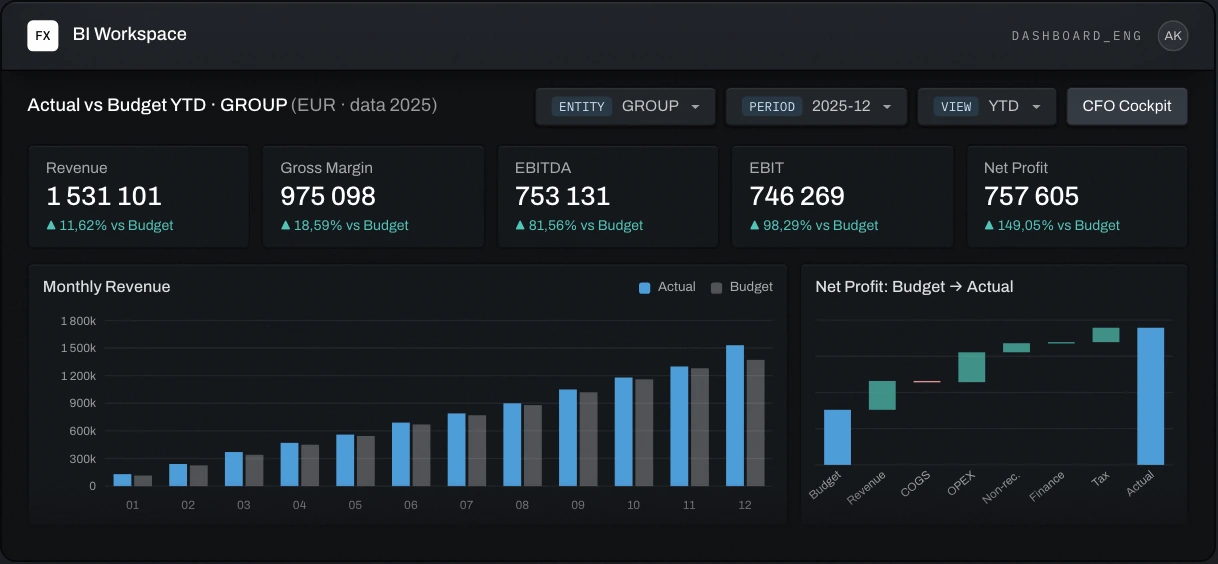
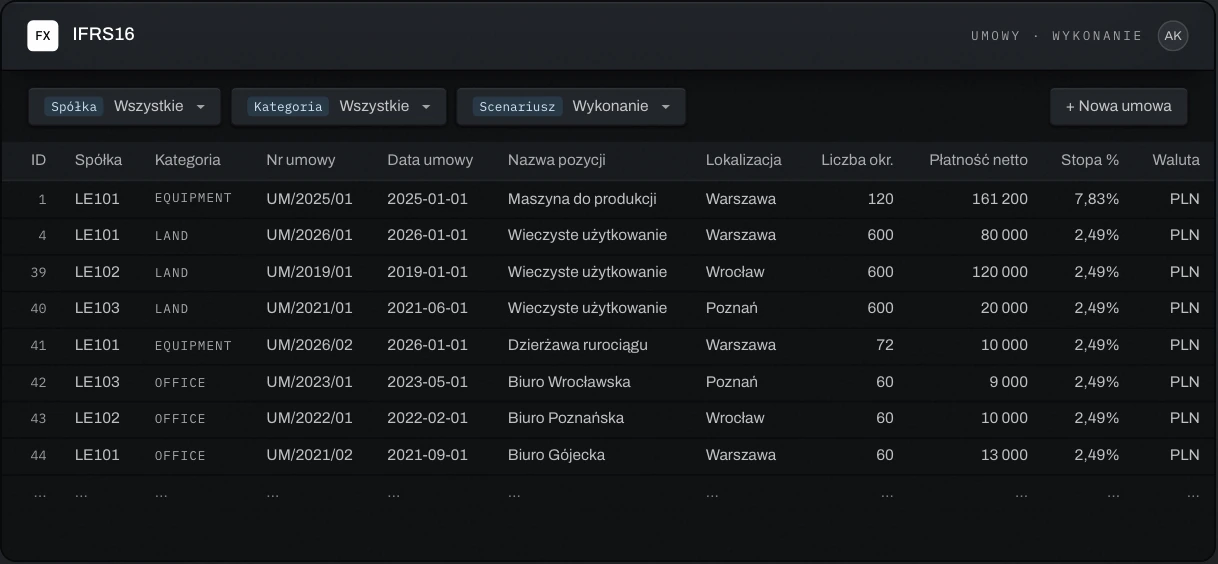
Pick a tile and see what you gain by choosing Fincorex®
Dane z różnych źródeł, długie zamknięcia miesiąca.
Scattered data unified in one system.
One formula error and the report shows incorrect data.

Precise tracking of changes made.
Every report assembled and sent out from scratch.

Access based on organizational role.
Dozens of spreadsheets to merge and reconcile.

Automatic aggregation through uniform templates.
Each department plans in a different layout.

Customizable to each department's specifics.
Repetitive tasks still require manual work.

Easy to implement and scale.
A new account or permission waits in the queue.

Controlling manages the system on its own.
The report comes from the system, the explanation is written elsewhere.

Results and explanations in one place.
Every integration or enhancement is a separate project.

Open to integration and rapid development.
The company works according to the system's logic.

Forms, reports and rules built around how you work.
Access doesn't match user roles.

Each employee sees only what they're responsible for.
A new company or department requires rebuilding the model.

Scales as your organization grows.

Fincorex® is fully configurable to your organization's needs.
Fincorex® is designed for intuitive use from a controller's perspective. You work just like in Excel.
Built-in financial logic enables a fast, structured implementation that takes weeks rather than months.
Controlling adds and modifies system elements such as accounts, cost centers and permissions on its own, without IT support.
Entered data is consolidated instantly, with no extra procedures.
Pulls data from accounting systems such as Symfonia or Oracle. Can integrate with any data source.
Transparent data lineage: you know who made each change and when.
Your organization's data is protected by corporate account sign-in, MFA and regular system updates.
Analyzes data, delivers accurate insights and takes over administration, from adding users to adding new companies.
You always build dashboards and reports on up-to-date data, whether you use Fincorex® BI or Power BI, with no manual exports.
Your request
Agent 01 · Analyst

Analyzes data and writes variance comments that go straight into the form.
Agent 02 · Operator

Helps automate daily controlling tasks: forms and rules.
Agent 03 · Architect

Securely manages the controlling environment: applications, models and permissions.
Your approval
„Jest to kluczowy system do raportowania wyników naszej organizacji.”

“We implemented Fincorex® for our financial reporting process and sales data by SKU and customer, within weeks!”

“Fincorex® is our core controlling system.”



Each one started where old tools were no longer enough. Pick one and see what changed.

Management consolidation under IFRS in a multi-sector holding — P&L, balance sheet and cash flow for over forty companies, in eight currencies. Results compared with budget, forecast and prior year, excluding the impact of exchange rate changes.
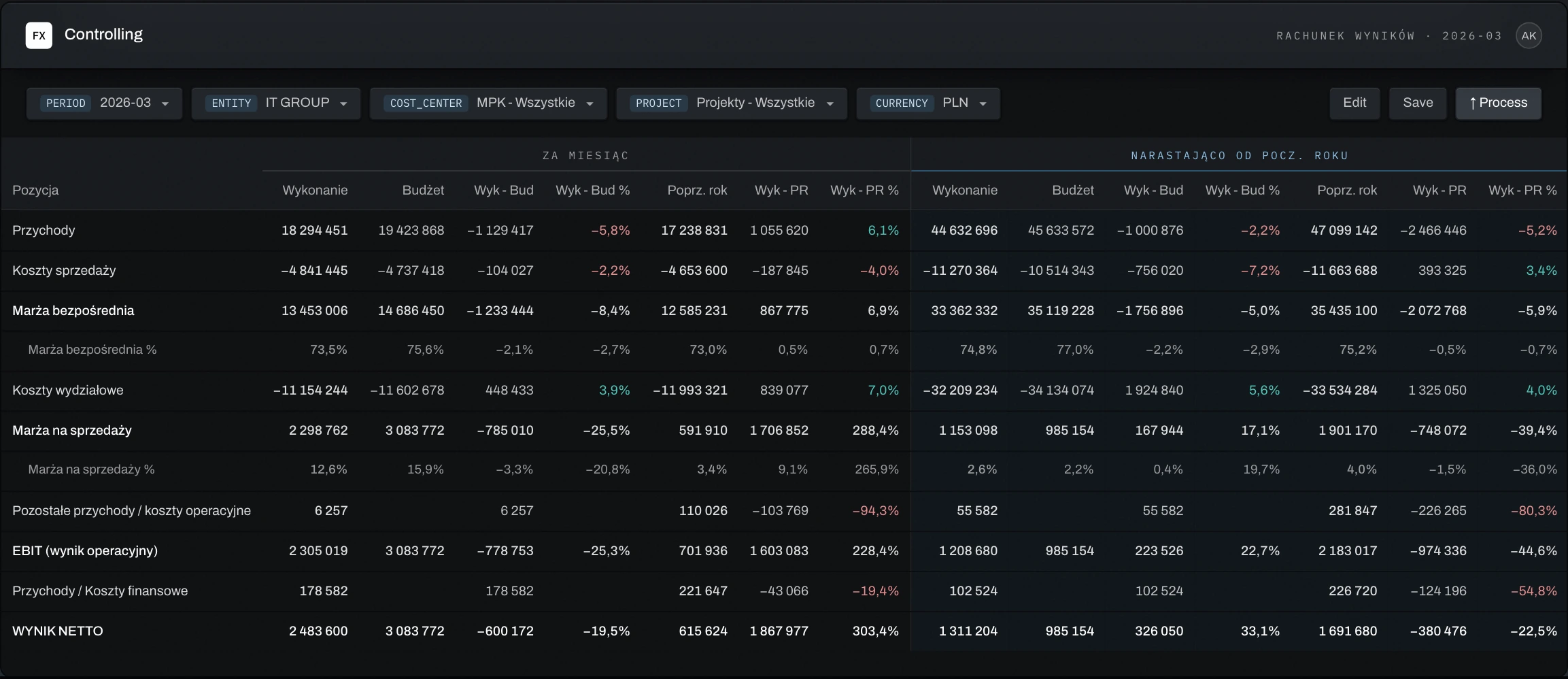
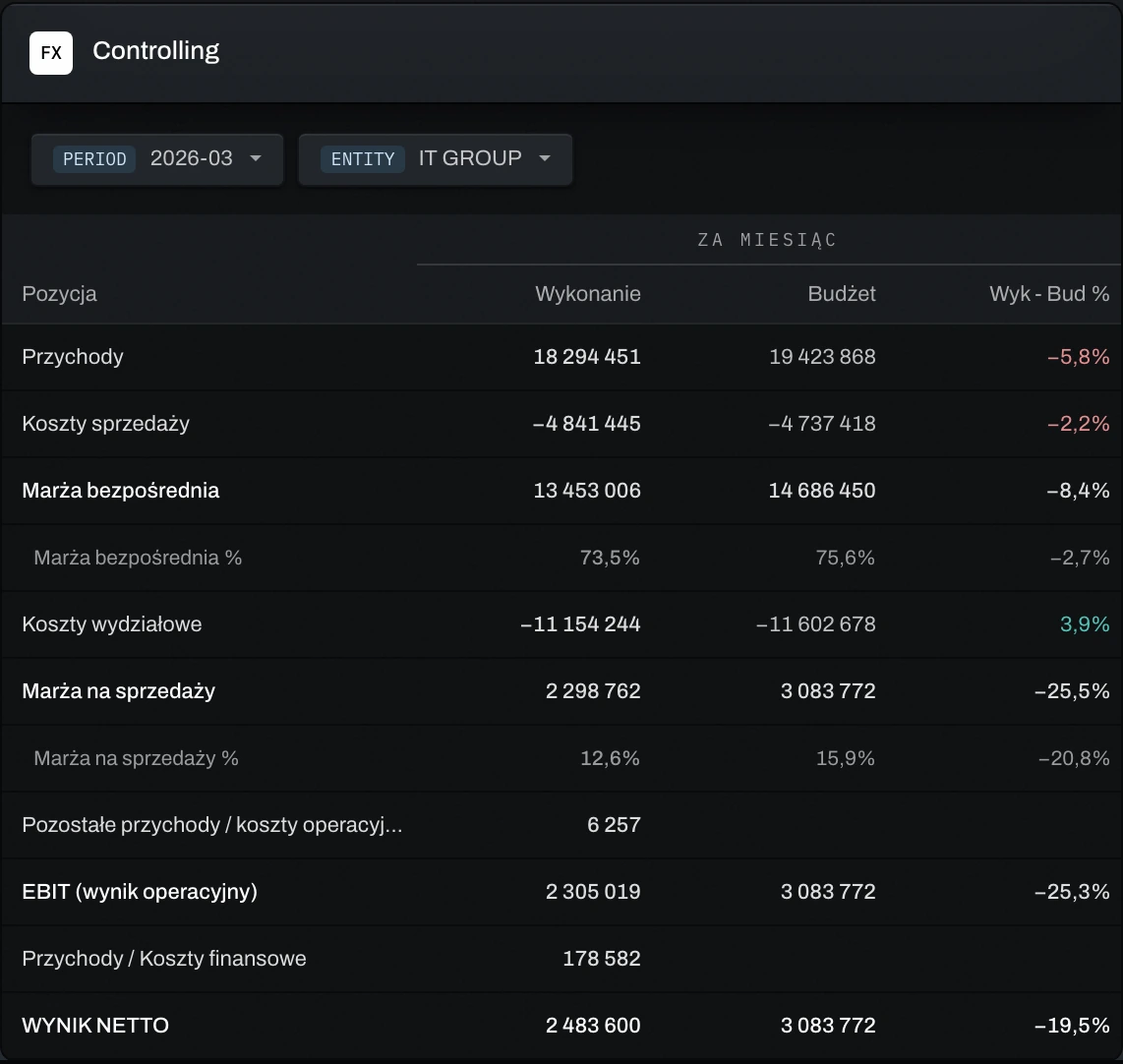
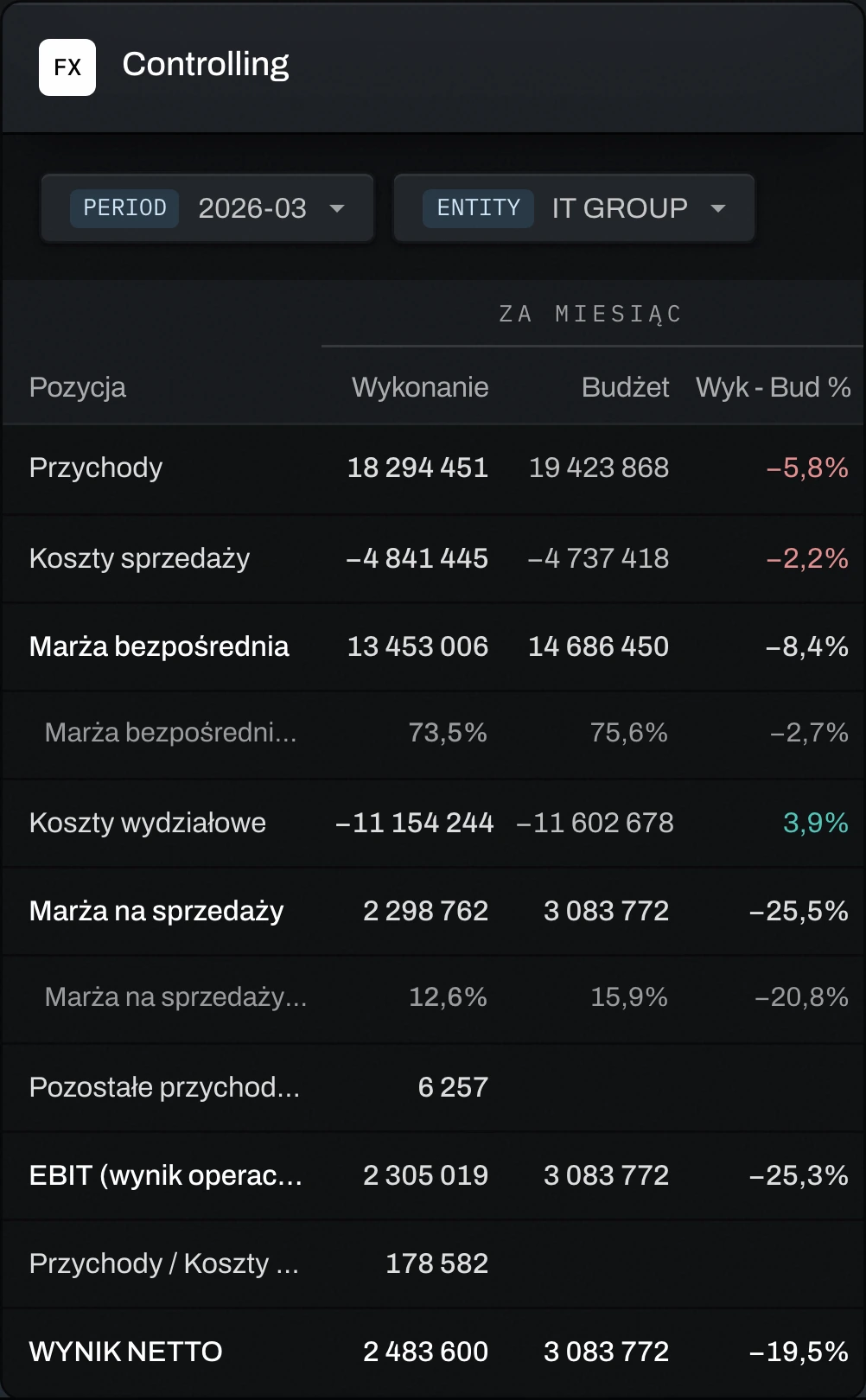
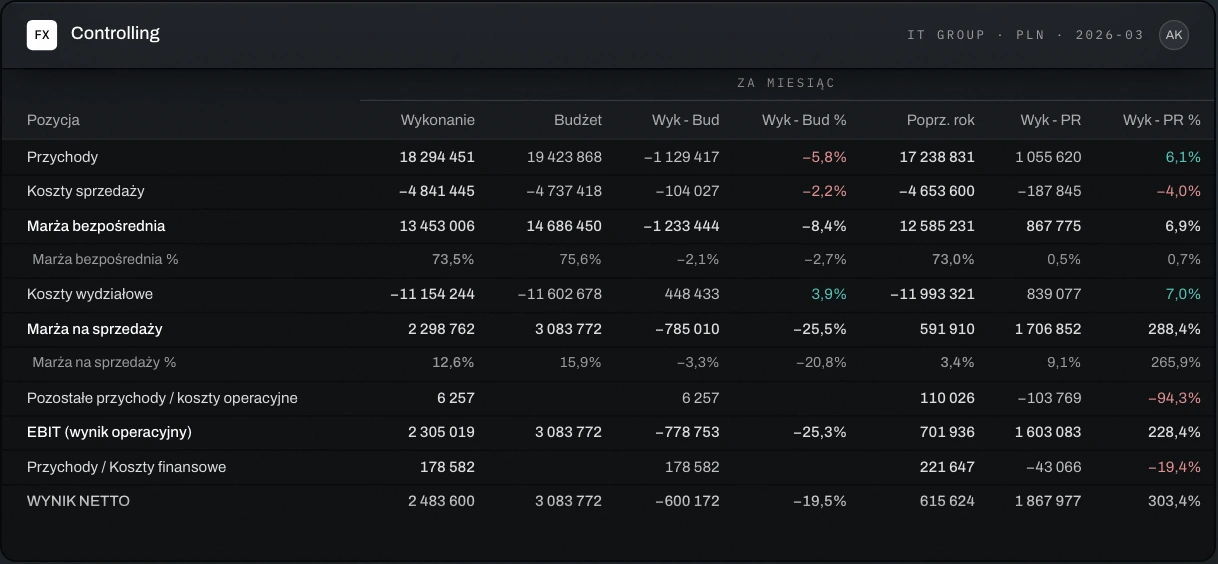
A comprehensive controlling solution for an IT company — a full P&L for cost center owners and margin analysis for PMs, across one hundred cost centers in five companies. A monthly report per cost center and project with drill-down to accounting details.
Capital expenditure planning at a pharmaceutical company — a hierarchy of over a thousand projects and over two hundred project managers, with a budget and forecast five years ahead, in three transaction currencies.
Department and project costs at a biotech company — over two hundred OPEX cost accounts in a hierarchy of more than a hundred departments. Access by department and cost line, plus by project.
We start with your model and finish when controlling runs the system on its own.
Send us your reporting model or data collection process. We'll rebuild it in Fincorex® and show it to you at our next meeting — before you decide.
We design forms, reports and rules around how you already work. We don't change your company to fit the tool.
We integrate accounting, ERP, sales and HR once. Reports let you analyze accounting details.
After training, you add accounts, cost centers and permissions yourselves — no IT tickets. We stay on for support and advisory.
How long implementation takes
a few weeks
Smaller projects: planning capital expenditure, departmental or personnel costs.
2–4 months
Extensive implementation for controlling or financial consolidation.
SaaS or your own servers — your choice. With SaaS, the vendor handles infrastructure, updates and backups — patches roll out without interrupting work. Everything else works the same in both.
Sign-in
Data in the system is encrypted.
Permissions
Everyone sees only the data they need for their work. Cross-permissions too.
Audit
Who changed a number and when — traced back to the source.
Can't find your answer? Write to us.
Model scope, number of companies and number of users.
Implementation time depends on the project's scale and integration scope. Smaller projects, such as planning capital expenditure, departmental or personnel costs, can be implemented in just a few weeks.
An extensive Fincorex® implementation for controlling or financial consolidation usually takes 2 to 4 months.
Controlling adds and modifies system elements such as accounts, cost centers and permissions on its own, without IT support.
The system's open architecture enables integration with popular accounting and ERP systems such as Symfonia, SAP, Oracle, Microsoft Dynamics and enova365, as well as HR and sales modules and project management tools.
Fincorex® is a web application designed to handle the challenges of large organizations where hundreds of employees need to plan budgets and analyze costs together. The system integrates all data in one place, updates it in real time and lets many people work simultaneously on the same forms.
The system has built-in financial logic. It was created by controlling specialists, which makes it not only efficient but also intuitive, simple to use and easy to maintain.
Fincorex® integrates with MS Excel and also has a Power BI connector.
During implementation, we provide training for users and administrators so they can make full use of the system in their daily work. Training covers both using the application and support in setting up controlling processes.
We also provide additional technical and business support services, including process consulting and follow-up training. This way, clients can count on our support as their organization's processes evolve.
We offer the system in two deployment models: on-premise and SaaS.
In the on-premise version, the system is installed directly on the client's servers. This gives the client full control over the environment: from configuration and security to compliance with internal and external regulations. It's the solution for organizations that fully manage their own infrastructure.
In the SaaS model, responsibility for infrastructure, maintenance, updates and security lies with the vendor, Fincorex®. The client uses the system on a subscription basis, with no need to invest in hardware or IT resources, and can cancel with one month's notice.
We maintain the system to the highest standards so clients get a secure, stable solution.
We continuously monitor the application's availability, performance and security. We roll out new features, fixes and security updates without disrupting users' work. We perform automatic backups and ensure data can be quickly restored when needed. We implement and follow a company security policy that includes encryption, access control and MFA, among other measures.
Yes. In Fincorex®, you can create detailed permission groups and give users access only to the data they need for their work. For example, PMs analyze the profitability of their own projects only, KAMs plan and monitor revenue from their own clients, and cost center heads see financial results for their own department only.
The system also supports so-called cross-permissions. For example, the fleet manager forecasts all costs in their own department but also needs to plan fleet-related costs for every department in the company.
As a Proof of concept, we'll rebuild your reporting or planning model in Fincorex® and show it to you at our next meeting.
